Otoo1.4
Publisher Description


Otoo is a streamlined, one-screen groovebox designed for frictionless music production.
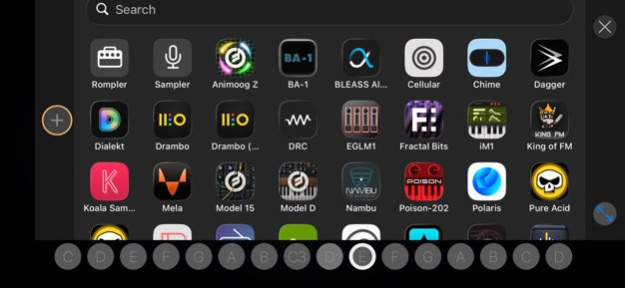
Built around an innovative free-form step sequencer, Otoo breaks away from rigid grids, allowing you to place, drag, and stack notes freely across independent rows. Whether you are sketching out ideas using the native built-in engine and sampler or hosting your favorite third-party AUv3 plugins, Otoo delivers a distraction-free environment that prioritizes speed and musical flow.
On iPhone, the interface dynamically scales to give your AUv3 instruments a near-fullscreen home, paired with a compact, highly responsive keyboard for immediate creation on the go.
Otoo also includes Otoo MIDI, an AUv3 MIDI processor version of the app. It brings Otoo’s pattern-based sequencing into compatible AUv3 hosts, where playback follows the host timeline and instruments are routed as MIDI Out destinations instead of audio instruments.
Distraction-Free Workflow
. The single-screen layout keeps your sequence, arrangement and mixer visible at all times so you never have to dive into menus.
. A free-form step sequencer lets you place, drag, and stack notes across any row without rigid instrument or track restrictions.
. Step editing mode gives you precise control over note length, velocity, and timing subdivisions.
. The gesture-driven mixer allows for quick volume adjustments, muting, and soloing directly from the main grid.
. 4 rows on iPhone and 5 on iPad, with multiple instruments available in each row at different steps
. 2-octave keyboard for playing and learning real notes
Sounds and plug-ins
. Up to 8 instruments per project
. Built-in sounds and sampler
. Use any installed AUv3 instruments in a large, near-fullscreen view with a compact keyboard
. Up to 2 AUv3 effects per instrument
. Sampler with instant key-by-key recording and chromatic mapping
Patterns to full songs
. Build songs from simple patterns
. Draggable loop markers for quick arrangement changes
Performance mode
. Live sequencer and audio effects such as reverse, beat repeat, randomize, swing, triplet, tape, and more
. Play the pattern like a keyboard by tapping steps directly
Other features
. Main output with built-in level protection
. Automatic metronome when recording live into empty patterns
. Export patterns or full songs as WAV or MP3 for easy sharing
. Export performances as perfect loops
. MIDI export
. Supported time signatures: 4/4, 3/4, 4/4T and sequencer swing.
Version History Otoo MIDI is here: a new AUv3 MIDI processor extension for using Otoo’s sequencer inside compatible hosts. 1.4 Jul 11 Fixed an issue where sustained instruments could stop retriggering cleanly after several loop passes. 1.3 Apr 1 What’s New
• Added support for time signatures in the Tempo panel: 4/4, 3/4, and 4/4T.
• Added MIDI export.
• Added audio recording in Performance mode. The Rec button now turns into a Tape icon, and recordings can be bar-quantized, prepared as perfect loops, and pasted into the Sampler.
Improved
• Steps in a row no longer stop overlapping notes, so glide now works properly with some instruments.
Fixed
• Fixed issues with some Bluetooth speakers and headphones.
• Fixed an issue where an instrument node could become invisible after being removed.
• Various minor fixes and improvements. 1.2 Mar 27 Fixed issues with BlueTooth audio. 1.1 Mar 20 1.0 Mar 20
About Otoo
The company that develops Otoo is Jaroslaw Jacek. The latest version released by its developer is 1.4.
To install Otoo on your iOS device, just click the green Continue To App button above to start the installation process. The app is listed on our website since 2026-10-14 and was downloaded 0 times. We have already checked if the download link is safe, however for your own protection we recommend that you scan the downloaded app with your antivirus. Your antivirus may detect the Otoo as malware if the download link is broken.
How to install Otoo on your iOS device:
- Click on the Continue To App button on our website. This will redirect you to the App Store.
- Once the Otoo is shown in the iTunes listing of your iOS device, you can start its download and installation. Tap on the GET button to the right of the app to start downloading it.
- If you are not logged-in the iOS appstore app, you'll be prompted for your your Apple ID and/or password.
- After Otoo is downloaded, you'll see an INSTALL button to the right. Tap on it to start the actual installation of the iOS app.
- Once installation is finished you can tap on the OPEN button to start it. Its icon will also be added to your device home screen.
Program Details
System requirements
Download information
Pricing
Version History
version 1.4
posted on 2026-10-14
Version History Otoo MIDI is here: a new AUv3 MIDI processor extension for using Otoo’s sequencer inside compatible hosts. 1.4 Jul 11 Fixed an issue where sustained instruments could stop retriggering cleanly after several loop passes. 1.3 Apr 1 What’s New
• Added support for time signatures in the Tempo panel: 4/4, 3/4, and 4/4T.
• Added MIDI export.
• Added audio recording in Performance mode. The Rec button now turns into a Tape icon, and recordings can be bar-quantized, prepared as perfect loops, and pasted into the Sampler.
Improved
• Steps in a row no longer stop overlapping notes, so glide now works properly with some instruments.
Fixed
• Fixed issues with some Bluetooth speakers and headphones.
• Fixed an issue where an instrument node could become invisible after being removed.
• Various minor fixes and improvements. 1.2 Mar 27 Fixed issues with BlueTooth audio. 1.1 Mar 20 1.0 Mar 20
version 1.3
posted on 2026-07-01
Version History Fixed an issue where sustained instruments could stop retriggering cleanly after several loop passes. 1.3 Apr 1 What’s New
• Added support for time signatures in the Tempo panel: 4/4, 3/4, and 4/4T.
• Added MIDI export.
• Added audio recording in Performance mode. The Rec button now turns into a Tape icon, and recordings can be bar-quantized, prepared as perfect loops, and pasted into the Sampler.
Improved
• Steps in a row no longer stop overlapping notes, so glide now works properly with some instruments.
Fixed
• Fixed issues with some Bluetooth speakers and headphones.
• Fixed an issue where an instrument node could become invisible after being removed.
• Various minor fixes and improvements. 1.2 Mar 27 Fixed issues with BlueTooth audio. 1.1 Mar 20 1.0 Mar 20
